(Laravel + Nginx + Namecheap Domain)
Why This Guide Exists
If you’re running an e-commerce business, email is not optional.
Order confirmations, invoices, and payment alerts are part of customer trust.
AWS SES is one of the most reliable and cost-effective email services, yet many developers struggle to make it work outside AWS—especially on DigitalOcean with Nginx.
This guide is based on a real production setup, not documentation theory.
Every issue covered here was faced, debugged, and solved in a live environment.
Who This Guide Is For
This article is for you if:
- You host your e-commerce app on DigitalOcean
- You use Laravel + Nginx
- Your domain email is from Namecheap
- You want reliable order confirmation emails
- You are tired of vague AWS SES errors
Architecture Overview (Simple & Reliable)
Customer Order
     ↓
Laravel Application
     ↓
AWS SES (Mumbai Region)
     ↓
Customer Inbox (Gmail / Outlook)
No SMTP hacks.
No shared mail servers.
No Gmail workarounds.
Why AWS SES Is a Smart Choice for E-commerce
AWS SES is trusted by large platforms because it offers:
- High inbox delivery rate
- Very low sending cost
- Full control over domain reputation
- Built-in DKIM & SPF
- Seamless Laravel integration
Perfect for:
- Order confirmations
- Payment receipts
- Shipping notifications
- Password reset emails
Step 1: Verify Your Domain (Foundation of Trust)
Before sending any email, AWS must trust your domain.
What You Must Do
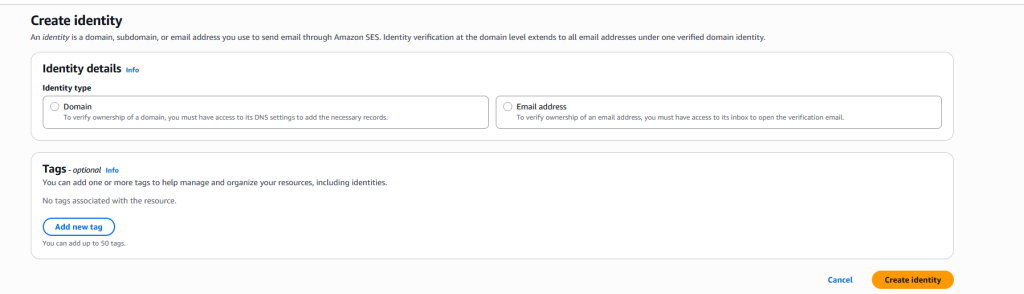
Go to AWS SES → Verified Identities
Add your domain
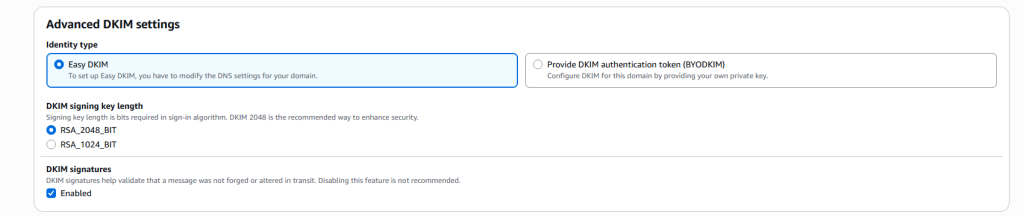
Copy the DKIM CNAME records
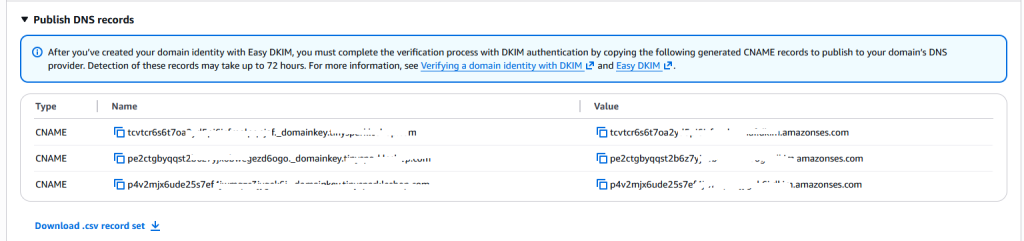
Add them to Namecheap DNS
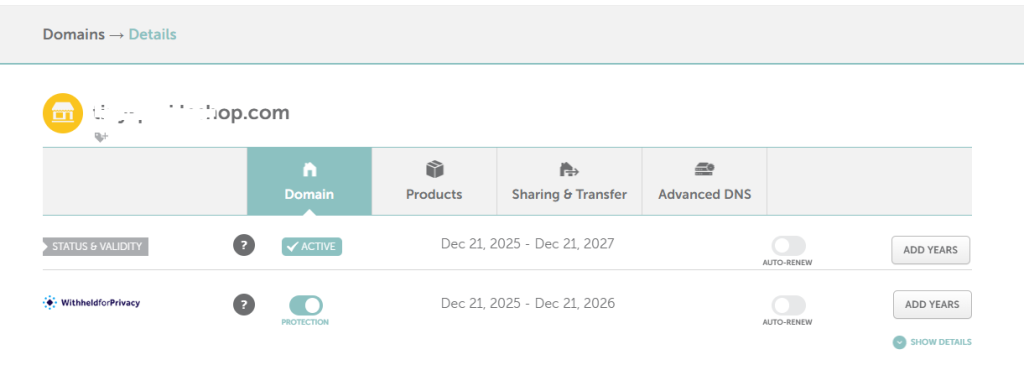
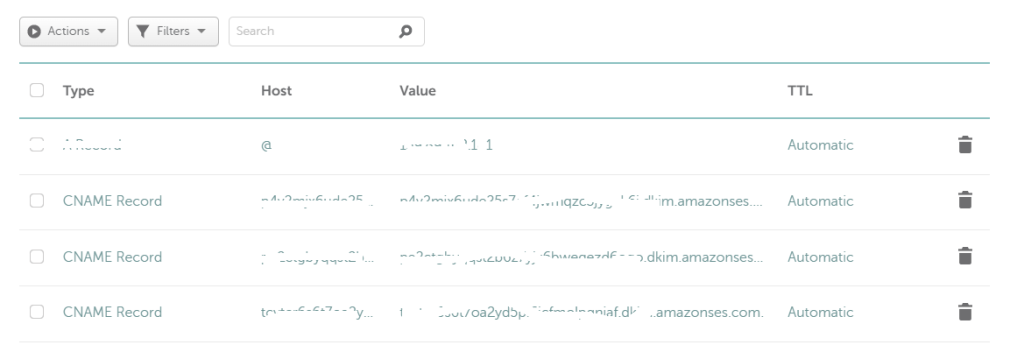
Wait for status: Verified

🔒 This step ensures your emails are not treated as spam.
Step 2: Understand SES Sandbox Mode (Most Common Confusion)
By default, AWS SES runs in Sandbox Mode.
What Sandbox Means
- You can send emails only to verified addresses
- Any unverified recipient will fail
- This is not a bug
If you see:
“Email address is not verified”
👉 SES is working exactly as designed.
Step 3: Laravel Configuration (Correct & Minimal)
.env (Production-Safe Example)
MAIL_MAILER=ses
MAIL_FROM_ADDRESS=no-reply@yourdomain.com
MAIL_FROM_NAME="Your Store Name"

AWS_ACCESS_KEY_ID=AKIAxxxxxxxx
AWS_SECRET_ACCESS_KEY=xxxxxxxx
AWS_REGION=ap-south-1
AWS_DEFAULT_REGION=ap-south-1
AWS_EC2_METADATA_DISABLED=true
🔴 Important:
DigitalOcean is not EC2, so metadata must be disabled.
config/services.php
'ses' => [
    'key'    => env('AWS_ACCESS_KEY_ID'),
    'secret' => env('AWS_SECRET_ACCESS_KEY'),
    'region' => env('AWS_REGION'),
],
config/mail.php
'default' => 'ses',

'mailers' => [
    'ses' => [
        'transport' => 'ses',
    ],
],
Step 4: Nginx + PHP-FPM (The Hidden Problem)
This is where most setups fail silently.
Why Emails Don’t Send on DigitalOcean
PHP-FPM does not load environment variables by default.
Laravel sees:
$_ENV['AWS_ACCESS_KEY_ID'] === ""
AWS SES then fails authentication.
The Proven Fix
Edit:
/etc/php/8.1/fpm/pool.d/www.conf
Add:
clear_env = no

env[AWS_ACCESS_KEY_ID] = AKIAxxxxxxxx
env[AWS_SECRET_ACCESS_KEY] = xxxxxxxxx
env[AWS_REGION] = ap-south-1
env[AWS_DEFAULT_REGION] = ap-south-1
env[AWS_EC2_METADATA_DISABLED] = true
Restart:
sudo systemctl restart php8.1-fpm
sudo systemctl restart nginx
Step 5: Verify the Setup (Confidence Check)
php artisan tinker
$_ENV['AWS_ACCESS_KEY_ID'];
✅ Shows value → SES ready
❌ Empty → PHP-FPM misconfiguration
Step 6: Test Email (Real Confirmation)
Mail::raw('Your order has been confirmed.', function ($mail) {
    $mail->to('verified@email.com')
         ->subject('Order Confirmation');
});
If this email arrives — your production pipeline works.
Step 7: Move SES to Production Mode
To send emails to real customers:
- SES → Account Dashboard
- Request production access
- Mention:
- Transactional emails only
- Order confirmations
- No marketing spam
Approval usually takes a few hours.
Common AWS SES Errors Explained Clearly
❓ “Missing required client configuration options: region”
Meaning: AWS region not loaded into PHP runtime.
❓ “Error retrieving credentials from instance metadata”
Meaning: SES is trying EC2 auth on DigitalOcean.
❓ “Email address is not verified”
Meaning: SES Sandbox restriction.
Why This Setup Is Trusted
- Uses official AWS SDK
- No SMTP relays
- No shared IPs
- Full domain authentication
- Scales automatically
This is how professional e-commerce platforms send emails.
Final Production Checklist
✔ Domain verified
✔ DKIM enabled
✔ Credentials loaded
✔ PHP-FPM fixed
✔ SES tested
✔ Sandbox removed
Final Thoughts
AWS SES works perfectly on DigitalOcean—when configured correctly.
Most failures happen because:
- Environment variables aren’t loaded
- Sandbox mode is misunderstood
- EC2 assumptions are incorrect
Once fixed, SES becomes rock-solid and low-maintenance.